DORiS
Debian Openbox Restoration System for your Desktop
Looks like one of those general stores from the middle of nowhere around here.
Fresh net-install. USB stick. One button. 15 minutes. Desktop.
github.com/rabmach/DORiS
Open source. MIT license. Honest documentation. Real bugs, real fixes, real desktop.
DORiS is a desktop restoration system for Debian. It takes a bare net-install and, in one command, builds a complete hardened Openbox desktop — keyboard-driven, privacy-first, wicked function, ready to work in ~15 minutes. It is not a distro. It is not a live image. It is one kit, run from a USB stick, that recreates this fabulous desktop (yours, now!) on any amd64 Debian box.
One stick. One button. Offline.
Hardened, configured, bespoke desktop.
ka-BAM.
How it works — two commands, two halves
System half
sudo ./restore.sh
Repos, packages, icons, themes, firewall, DNS, AppArmor, logs, cron — once per machine
Per-user half
./user-setup.sh
Dotfiles, ~/bin, wallpaper, browser assistant — once per human
The system half backs up every file it touches. The per-user half bakes $USER and $HOSTNAME into configs — no hardcoded names, ever. Both halves re-run safely. No framework required: pure bash, zero dependencies, readable end to end in an hour.
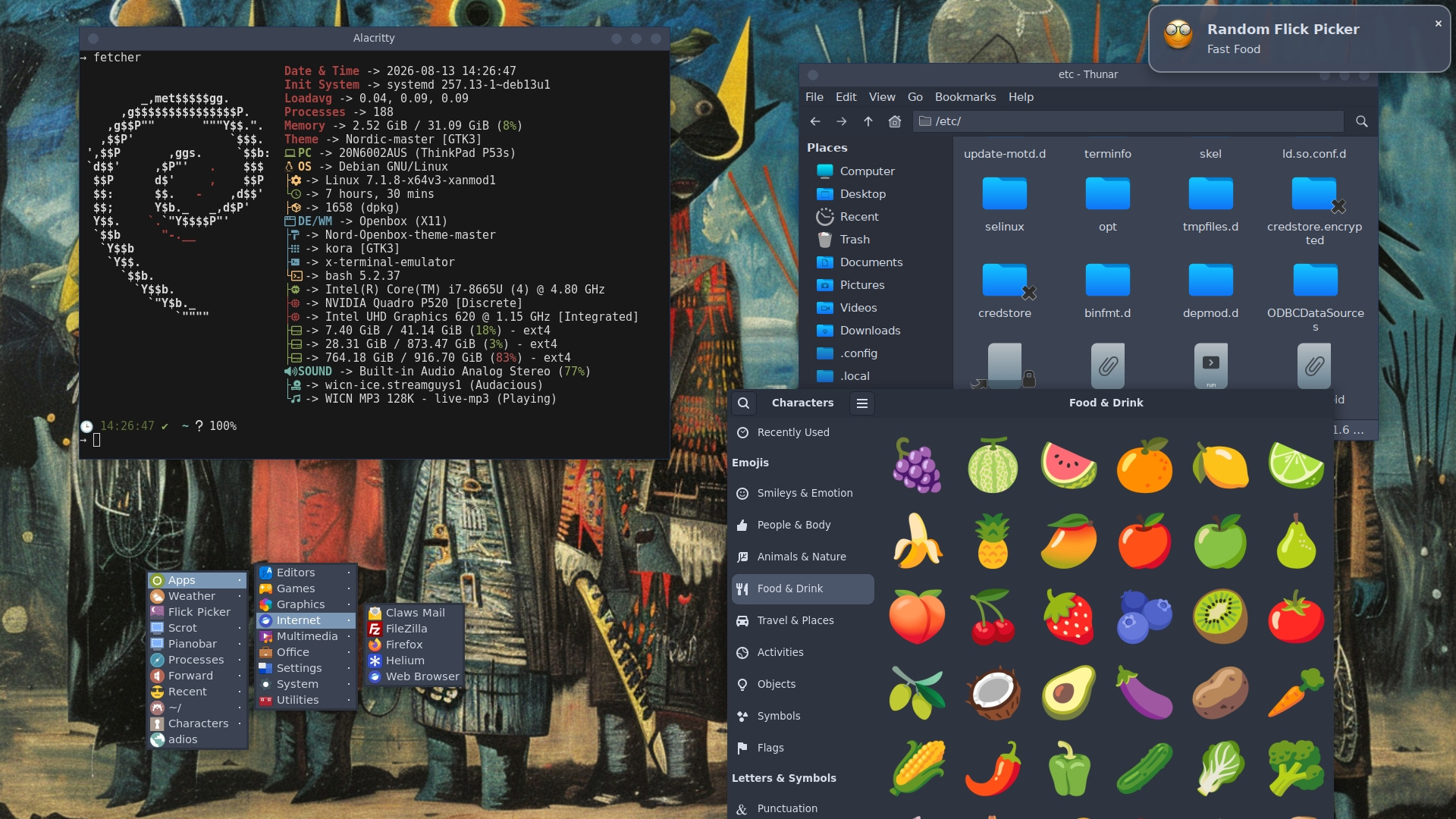
The desktop — Openbox, keyboard-first
No desktop environment weight. Openbox is the lightest fully custom keyboard-driven window manager in the Linux ecosystem — and DORiS makes it friendly. Ships with fastcompmgr for optional compositing: transparent terminals, smooth fades, no GPU tax.
Keybinds before you learn them
- Win+K — KeePassXC
- Win+P — Pandora (pianobar)
- Win+T — terminal (Alacritty)
- Win+N — random music
- Win+O — reconfig Openbox
- Win+F — Thunar file manager
- Win+U — weather
- Ctrl+Alt+P — random movie picker
Desktop components
- Thunar — file manager, archive plugin, drag-and-drop
- LXPanel — taskbar, system tray, alt+F2 run
- Alacritty — GPU-accelerated terminal
- fastcompmgr — optional compositing
- Starship — prompt with git status
- Obsidian icons + Arc theme

The security layer — opinionated by design
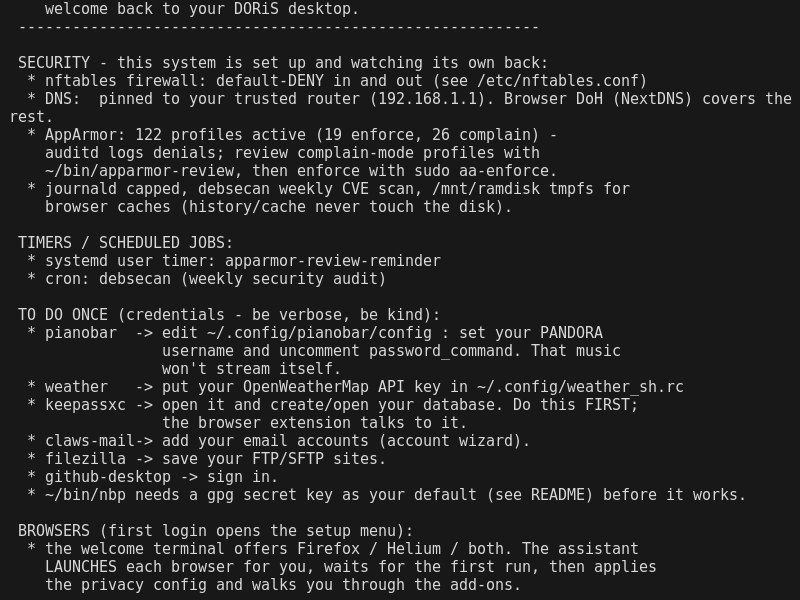
nftables: default-deny inbound and outbound
Not "permissive until proven bad." Deny everything, allow only what's needed.
- Outbound: loopback, ICMP, DHCP, NTP, DNS to private ranges, mDNS — and all TCP
- Inbound: nothing. Ever.
- The firewall is the first wall. The DNS posture is the second.
DNS: auto-detected, not assumed
DORiS reads the network reality and adapts:
- Behind a router (home, office): DNS pinned to the router. Trust is the operator's.
- Direct ISP link: stubby DoT to Cloudflare + Quad9 on localhost. All NM connections pointed at it.
- Unknown network: treated as untrusted. Encrypted DNS enforced.
systemd-resolved is removed. RA/DHCPv6-pushed DNS entries were silently bypassing the router policy — gone.
AppArmor: audit first, enforce after
- Profiles ship in complain mode — log everything, block nothing.
- Weekly reminder timer to run
aa-logprof, review, thenaa-enforce. - Auditd running, journald capped, debsecan weekly CVE scan.
Browser privacy
- Firefox: hardened user.js, DuckDuckGo, DoH (Cloudflare + Quad9), uBlock Origin, ClearURLs, SponsorBlock, Multi-Account Containers, KeePassXC-Browser
- Helium: uBlock built-in, DuckDuckGo, DoH via Quad9, no preloading, no suggestions, MRU tab cycling, zen mode, GTK theme
- Browser caches on
/mnt/ramdisk— history never touches disk - Interactive assistant watches each extension install — no assumptions

Welcome — generated from the kit itself

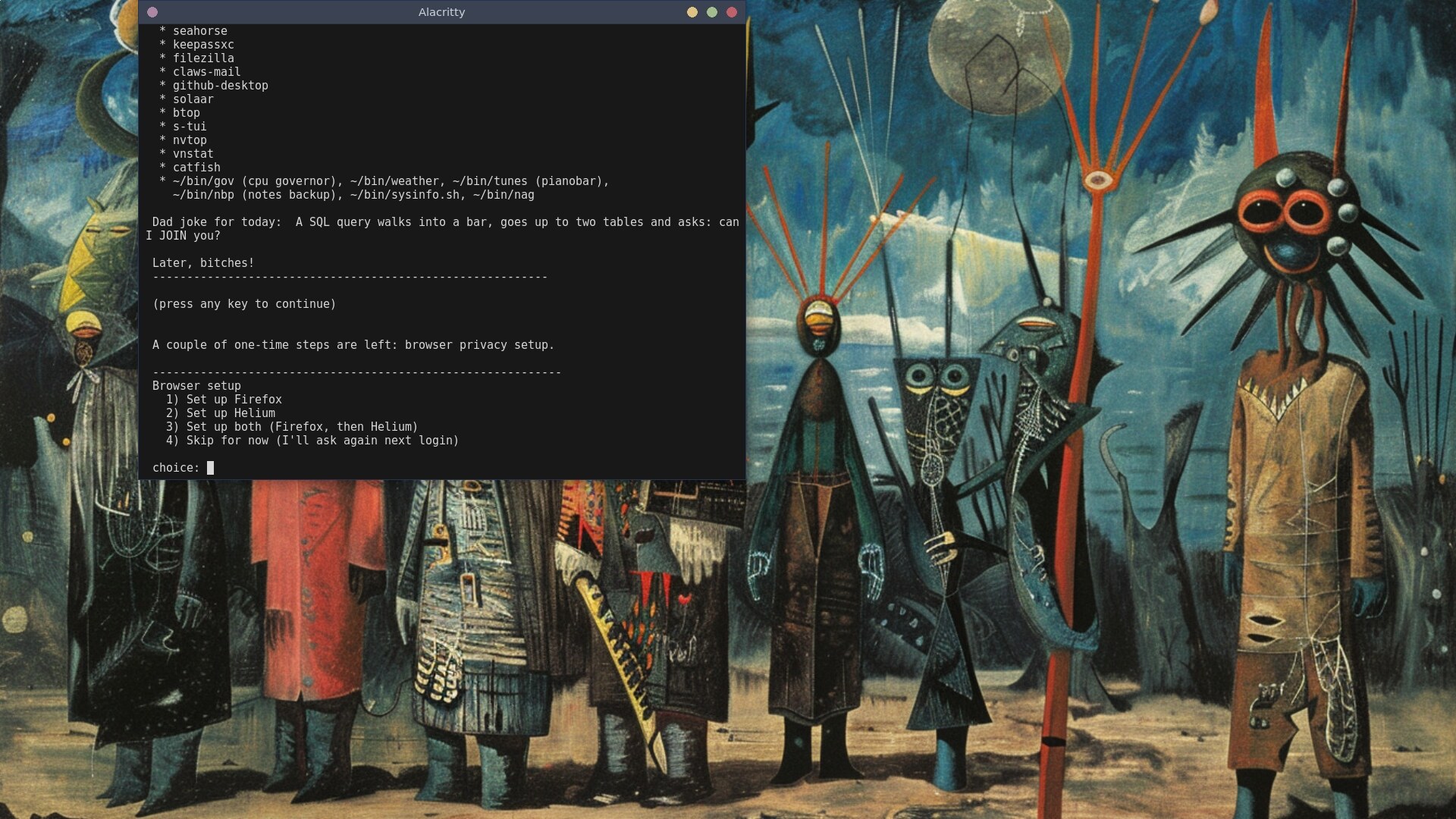
Browser assistant — interactive, watches until installed
The package suite — chosen, not accumulated
191 packages, each one picked. Not a desktop environment's 800+ — a curated set that works together.
Claws Mail — the most reliable desktop email client in the Linux ecosystem. Bogofilter (spam), fancy plugin (HTML), PGP/MIME, vCalendar. Stable since 1997. It does not surprise you.
Security
KeePassXC + seahorse + gnome-keyring. Passwords, GPG keys, session credentials. Browser extension talks to KeePassXC. ~/bin/nbp appends passwords to the GPG store.
Media
mpv (hardware-accelerated), audacious, gimp, ffmpeg, imagemagick, yt-dlp, simplescreenrecorder. All chosen for reliability, not novelty.
Development
Geany + Sublime Text + git + GitHub Desktop + ripgrep + meld. All keyboard-driven, all integrated.
System monitoring
htop, btop, inxi, powertop, smartmontools, s-tui. All available from ~/bin scripts and the welcome screen.
The cross-functionality layer
gpicview opens from Thunar. ffmpegthumbnailer makes video thumbnails in Thunar. seahorse manages GPG keys used by claws-mail, ~/bin/nbp, and git signing. KeePassXC talks to Firefox and Helium via browser extension. pianobar controlled from ~/bin/tunes, keybound to Win+N. notification-daemon: any script can notify-send to the desktop.
The human factors
DORiS respects how humans actually use a computer. Keyboard-driven by default, mouse available — not the other way around. Welcome screen at login, not a splash screen. Browser setup is interactive — you launch, you close, you watch. Credentials listed in logical order: KeePassXC first (create database), then email, then FTP, then GitHub. The kit is capturable — tools/capture.sh rebuilds the kit from a live box. Your configuration is code, not a feeling.
The numbers
- Packages in core.list: 191
- System half runtime: ~10-20 minutes
- Per-user half runtime: ~5 minutes
- Total end-to-end: ~15 minutes
- Bugs found and fixed: 11
More numbers
- Firewall posture: default-deny in AND out
- DNS modes: 3 (router / encrypted DoT / untrusted)
- Browser configs: 2 (Firefox + Helium)
- Framework dependencies: 0 (pure bash)
- Test users verified: many, all clean
What DORiS is NOT: A distro. A menu of desktop choices. A cloud service. Wayland-ready. For Linux newcomers. It is a restore system for Debian trixie that recreates one curated way of computing. Opinionated by design.
You compute, don't you? Why don't you use DORiS?
The path: Net-install Debian trixie. Reboot, login as root, install aptitude, sudo, git. Visudo to give the user sudo. Log out and back in as regular user, clone the repo and run: sudo ./restore.sh and then ./user-setup.sh — reboot, login. Welcome message gives a ton of handy info and offers browser setup for Firefox and Helium to include preconfigured profiles, handy extensions, and a bit of security. Feedback welcomed, encouraged.